
Keep margins accurate in flight: every role change, tracked with an effective date

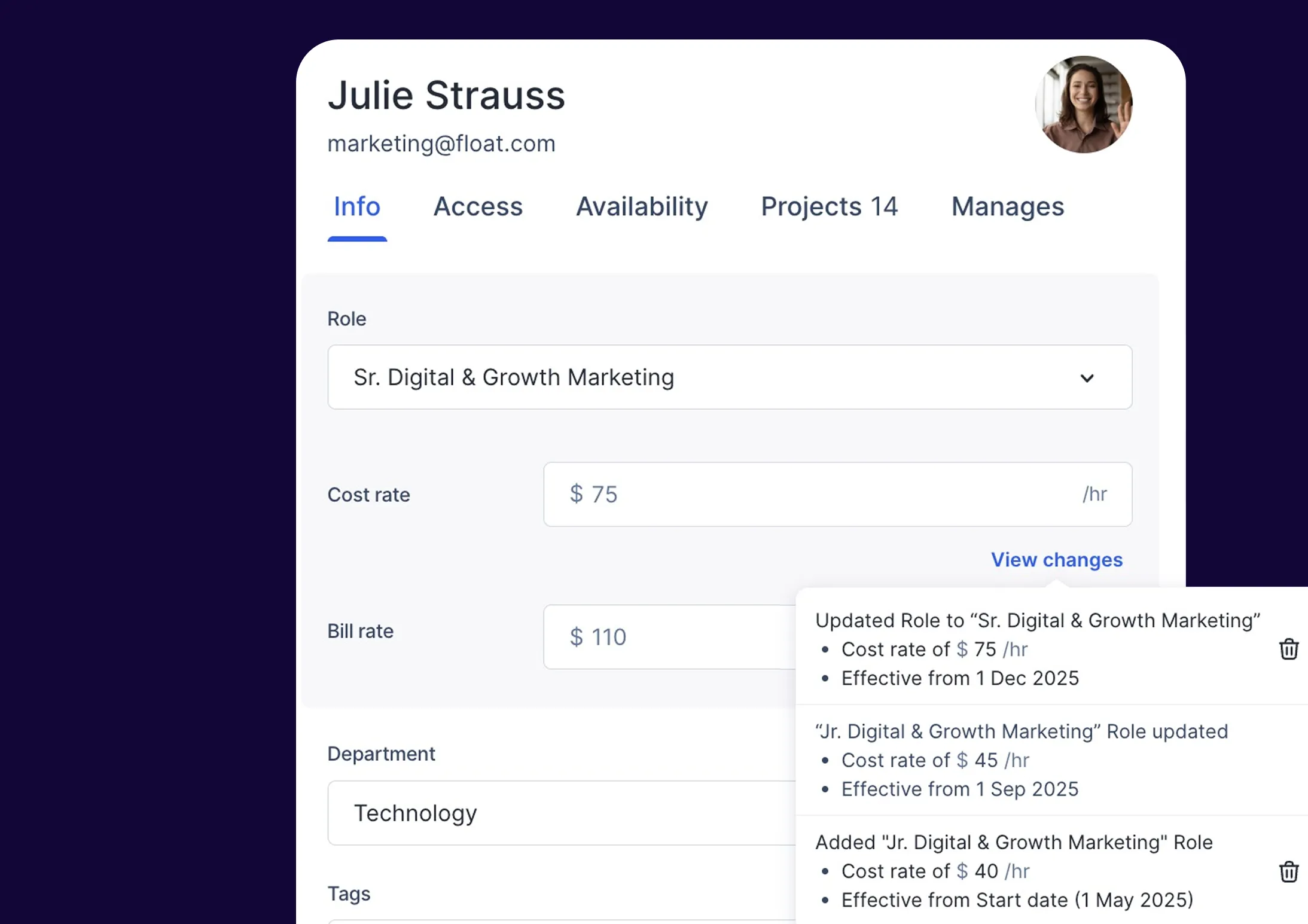
Roles and rate changes should never put your margins at risk. With Float’s new point-in-time role updates, you can track exactly when a person’s role changes and how it impacts their associated rates. Each update is automatically time-stamped with an effective date, so your reporting reflects the right rates at the right time.
Note: Until now, the role and rate change history has been available through the API. If you’ve been using it that way, nothing changes for you. With this latest update, you can now view and edit role change history directly in the UI.
Capture a snapshot of role changes
When you update a person’s role, you choose an effective date. Float stores every change as its own entry, giving you a clear record of how that person’s role and corresponding rates have evolved. Past work keeps its original rate. Future work uses the new one. Your reports reflect these changes automatically, at the moment they take effect, so your financials are always accurate.
You can view and manage every change directly from the ‘Info’ tab of each person's profile. Everything is in one place, easy to read, and easy to manage.
Compensation updates incoming? No problem.
New year, new...rates? We've got you covered, ensuring your role changes remain up-to-date, while your reporting remains accurate and true to a specific point in time. Here are a few ways you might interact with the point-in-time role feature when working with Float:
Annual compensation updates
Your team runs its yearly salary review. Rates shift starting January 1. With point-in-time role updates, you set January 1 as an effective date, and Float keeps historical costs untouched—so in-progress projects won’t suddenly inflate. Your team’s margin reporting stays accurate into the new year, and your stakeholders stay confident.
New role assignments
A junior designer steps into a senior role mid-quarter. You update their senior role (and new rate) to start the following Monday. Float applies the role rate exactly when new responsibilities begin, so you can forecast and track the financial impact without disrupting work already in progress.
Market-driven adjustments
Your agency adjusts contractor rates in response to market conditions. Instead of manually tracking which projects should reflect the new cost rate, you add the updated role with an effective date. Float applies it automatically, ensuring your forecast reflects the real financial picture.
Where to review point-in-time role changes
The snapshot of role and corresponding rate changes, along with their effective dates, is displayed in the ‘Info’ tab of each person’s profile under ‘View changes’. To make a change, select a new role and add an effective date. Float handles the rest.


